


A look inside
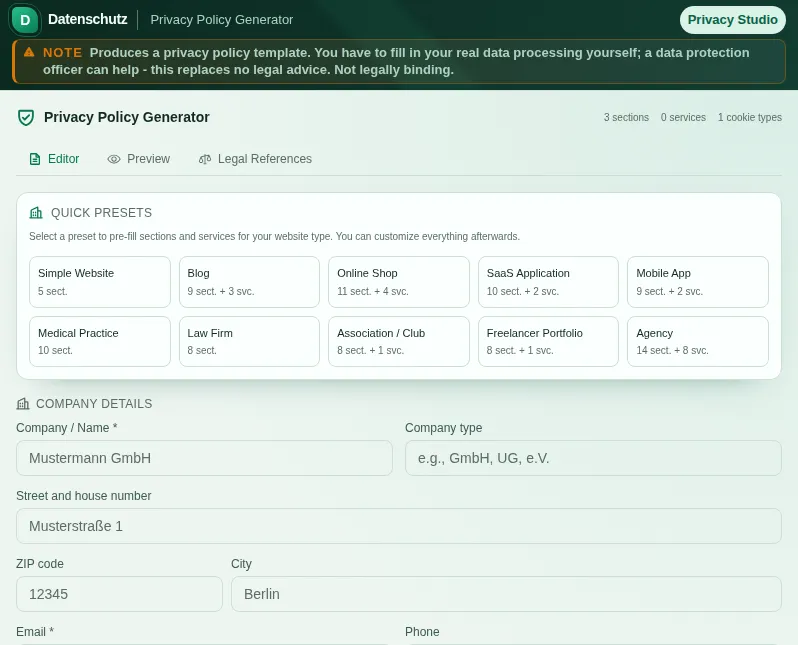
This safe preview shows what the tool is for without running account-only actions.
What Privacy Policy Generator does
The privacy policy is the document every website needs under Art. 13 and 14 GDPR: who processes which data, on what legal basis, for how long, and what rights you have as a data subject. It sounds like bureaucracy but it is mandatory - and done badly it is a real liability. The generator walks you through all the mandatory building blocks without turning you into a GDPR expert.
Instead of one generic wall of text, you pick from more than ten presets the one that fits your project: simple website, online shop, SaaS, app, medical practice, law firm, club and more. Each preset already brings the typical processing activities and sections, so you start not with a blank page but with something that is 80 percent there.
The real trick is the 20-plus third-party services. Google Analytics, Google Fonts, YouTube, the Meta pixel, Stripe, Mailchimp, hosting providers - you tick what you use and the generator adds the matching section with legal basis, purpose and a note on third-country transfer where relevant. Nothing is claimed wholesale that you do not actually use.
For every block the generator gives the concrete legal basis: Art. 6(1)(a) for consent, (b) for contract, (f) for legitimate interest. Data processing agreements under Art. 28, third-country transfers, storage periods and deletion policies each get their own section. The data subject rights - access, rectification, erasure, objection, complaint to the supervisory authority - are all in there.
Cookie categories can be included too, so the statement lines up with your cookie banner. If you need both, the cookie policy generator and this one use the same categories and legal bases. Still read both texts side by side once before you publish them.
In the end you export the finished statement as a PDF or copy it as HTML straight into your CMS. Everything runs data-frugally - your input only serves to assemble the text. And the honest framing: the generator gives you a solid, current foundation but does not replace legal advice. For special cases, health data or international group structures, have a specialist lawyer review the final version.
Features
10+ presets
Website, shop, SaaS, app, medical practice, law firm, club and more - each preset brings the typical sections.
20+ third-party services
Analytics, fonts, payment providers, newsletters, hosting - tick them and the matching section is added.
Legal bases included
Every section names the concrete basis under Art. 6 GDPR - consent, contract or legitimate interest.
Full data subject rights
Access, rectification, erasure, objection and complaint to the supervisory authority - all cleanly listed.
Third country and processors
Dedicated sections for third-country transfer and processing under Art. 28 GDPR where your setup requires it.
Cookie categories
Includes cookie categories so the statement fits your cookie banner. Compare the two briefly before use.
Export as PDF and HTML
Download the draft as a PDF or copy it as HTML into your CMS - after your review.
How it works
- 1
Pick a preset
Start with the preset that fits your project - website, shop, app, club or practice.
- 2
Tick your services
Select the third parties you actually use. The generator adds the section and legal basis automatically.
- 3
Fill in your details
Add the controller, contact and, if applicable, your data protection officer. Adjust retention periods as needed.
- 4
Review and export
Read the statement through once, export as PDF or copy the HTML code into your website.
Who needs this
Frequently asked questions
Do I still need to review the statement?
The generator covers the mandatory information under Art. 13 and 14 GDPR, names the legal basis for each block and lists the data subject rights in full. Whether your statement is accurate depends on whether you have declared all the services you actually use and whether your details (e.g. retention periods, processing agreements) are true. Spots marked [please check: ...] are yours to fill in. For special cases a legal review is recommended.
How is this different from a cookie policy?
The privacy policy covers all data processing on your site; the cookie policy specifically lists every single cookie with its storage duration. This generator can include cookie categories; for the detailed cookie table you additionally use the cookie policy generator.
Do I have to name a data protection officer?
Only if you are legally required to appoint one - for example with large-scale processing of special-category data or above a certain number of staff regularly processing personal data. The generator keeps the field optional; if you do not need one, you leave it out.
What about Google Fonts and third-country transfer?
If you use services that transfer data to the US or other third countries, the generator adds the corresponding section with a note on the transfer’s legal basis. For Google Fonts: self-hosting avoids the transfer entirely - often the cleanest solution.
Can I update the statement later?
Yes. If your services change, open the generator again, adjust the selection and export anew. Since nothing is tied to a server, you stay flexible and can keep the statement current at any time.
Does this replace legal advice?
No. The generator provides a current, structured foundation based on your input. For health data, international group structures or other special cases you should have the statement reviewed by a specialist lawyer.
Related tools

Cookie Policy Generator
Generate a cookie policy structured along TDDDG Sec. 25, GDPR Art. 6/7 and the ePrivacy Direc…

GDPR Cookie Banner Generator
Generate a customizable cookie consent banner as HTML/CSS/JS code. Includes 10 presets, live…

Imprint Generator
Generate a German Impressum with all mandatory details per § 5 DDG. All business types: GmbH,…

DPA Generator
Create a customizable DPA draft with Art. 28 GDPR building blocks, 9 TOM categories, 8 preset…

GDPR Art. 30 Helper
Create your GDPR Article 30 records of processing activities. All required fields, ready to p…
DPIA Quick Check
Check if a DPIA per Art. 35 GDPR is required. Short questionnaire, clear result.
Ready to use Privacy Policy Generator?
No installation. Included from Plus. Open it right in your browser.
Open now