


A look inside
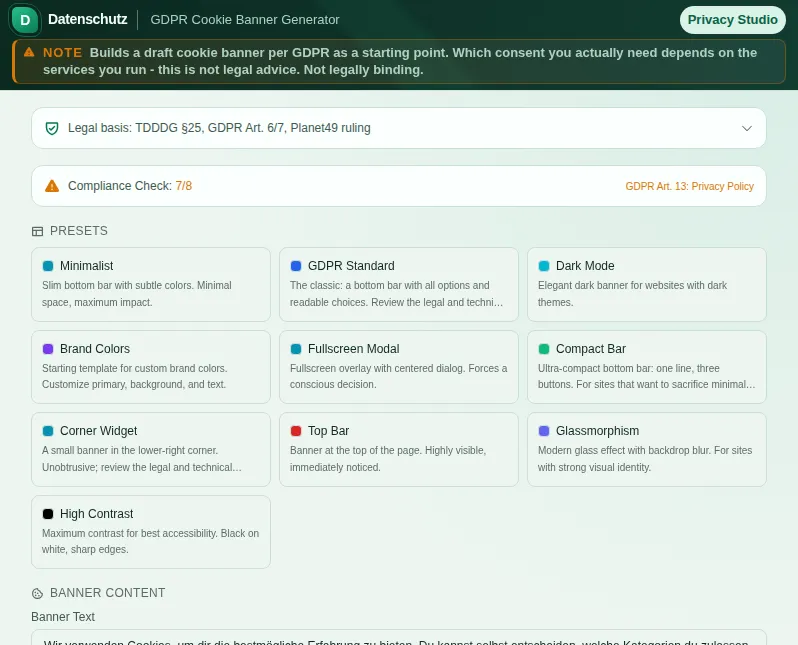
This safe preview shows what the tool is for without running account-only actions.
What GDPR Cookie Banner Generator does
Cookie banners are where data protection law meets design - and usually both lose. Either the banner is legally vulnerable because Reject is hidden or consent is pre-ticked, or it looks like a ransom note. This generator aims for the narrow path between: a banner that obtains genuine, informed consent while being fairly designed.
You get finished code, not a SaaS subscription. HTML, CSS and JavaScript you copy and drop into your site - no external scripts, no vendor lock-in, no monthly fee for a banner that is a few lines of code. The analytics snippet is wired so tracking only loads after active consent, not before.
Ten presets cover the common formats: bottom bar, top bar, centered modal, discreet corner widget. Adjust colors, position and categories so the banner matches your design, without hand-writing CSS. The live preview shows immediately how it looks on your site.
The technical checkpoints are a help, not a certificate. They read the generated code back: do Reject and Accept share the same styling? Are the buttons easy to read? Are there no pre-ticked checkboxes, as the CJEU’s Planet49 ruling demands? Is consent actively obtained rather than assumed from scrolling on? Anything still missing is listed plainly under "These are still missing".
The legal basis is concrete: TDDDG Section 25 requires consent for non-necessary cookies, GDPR Art. 7 defines what valid consent looks like, and the Planet49 ruling made clear that pre-ticked boxes are not consent. The generator turns these requirements into code so you do not have to rebuild them yourself.
To be honest: a cleanly built banner is the technical prerequisite, but it does not release you from categorizing your cookies correctly and explaining them in a cookie policy. The banner generator, the cookie policy generator and the privacy policy interlock. And as always: no substitute for legal advice, but a solid, dark-pattern-free start.
Features
Ready HTML/CSS/JS code
Copy and paste, no external script, no subscription. The banner is yours and runs without a third-party service.
10 presets
Bottom bar, top bar, modal or corner widget - the right starting point for your layout.
Live preview
Change colors, position and text and see instantly how the banner looks before you copy the code.
Technical checkpoints
A checking aid along TDDDG Section 25, GDPR Art. 7 and Planet49: equally styled Reject, no pre-ticked boxes. Not a legal assessment.
Rejecting as easy as accepting
Both first-layer buttons get the same fill, size and text colour. Fairly designed and aligned with current case law.
Tracking only after consent
The analytics snippet loads only after active consent, not before - exactly as the law requires.
Customizable categories
Necessary, functional, statistics and marketing - users consent selectively instead of all or nothing.
How it works
- 1
Pick a preset
Choose bottom bar, modal or corner widget - depending on how present the banner should be.
- 2
Customize
Set colors, texts and categories. The live preview reflects every change instantly.
- 3
Look at the checkpoints
See which points are still missing and add them - such as the link to the privacy policy or a banner text that is too short.
- 4
Copy the code
Copy the HTML, CSS and JS into your site. Drop your analytics snippet into the provided slot.
Who needs this
Frequently asked questions
Does the Reject button really have to be equal?
Yes. Supervisory authorities and courts increasingly require that rejecting is as easy and visible as accepting. A prominent Accept button next to a hidden Reject link counts as an unlawful dark pattern. The generator gives both buttons the same styling, and the checkpoints compare that in the generated code.
What was the Planet49 ruling?
In the Planet49 case (C-673/17, 2019), the Court of Justice of the EU ruled that a pre-ticked box does not constitute valid consent to cookies; Germany’s Federal Court of Justice followed in 2020. Consent must be active. That is why the generator builds no pre-selected consents - users have to click themselves.
Do I also need a cookie policy?
Yes. The banner obtains consent, but the full list of your cookies with name, provider and storage duration belongs in a cookie policy that the banner links to. The cookie policy generator produces exactly that and matches the banner.
Does my analytics really load only after consent?
The generated code is built so your tracking snippet only runs after active consent. You place your snippet in the provided slot - before that, the banner sets only technically necessary cookies that need no consent.
Do I pay monthly for the banner?
No. You get finished code that you embed once. There are no external scripts and no recurring fees - unlike many consent services that charge a subscription for a few lines of code.
Must I review the banner before use?
Yes. The generator implements selected technical requirements from TDDDG Section 25, GDPR Art. 7, and the Planet49 ruling. Whether the banner fits your use also depends on your services, categories, scripts, legal bases, and information. The code is a reviewable starting point and does not replace legal advice.
Related tools

Cookie Policy Generator
Generate a cookie policy structured along TDDDG Sec. 25, GDPR Art. 6/7 and the ePrivacy Direc…

Privacy Policy Generator
Create a customizable privacy-notice draft with 10+ presets, 20+ third-party services, cookie…

Imprint Generator
Generate a German Impressum with all mandatory details per § 5 DDG. All business types: GmbH,…

DPIA Quick Check
Check if a DPIA per Art. 35 GDPR is required. Short questionnaire, clear result.
DPA Generator
Create a customizable DPA draft with Art. 28 GDPR building blocks, 9 TOM categories, 8 preset…
Terms & Conditions Generator
Generate German terms and conditions (AGB) structured along German law for online shops, serv…
Ready to use GDPR Cookie Banner Generator?
No installation. Included from Plus. Open it right in your browser.
Open now