


A look inside
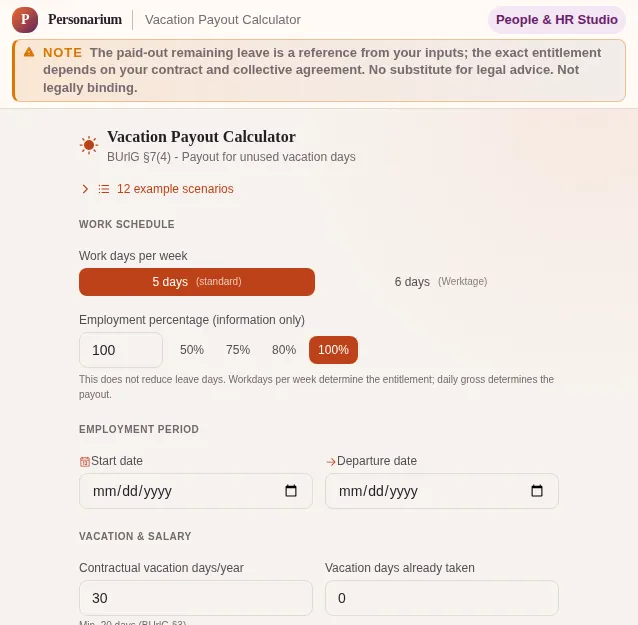
This safe preview shows what the tool is for without running account-only actions.
What Vacation Payout Calculator does
When your employment ends and you can no longer take your vacation, it has to be paid out. That is written in Section 7(4) of the German Federal Leave Act (BUrlG) and is not a favour from your boss, it is your legal right. Yet almost nobody checks whether the figure on the final payslip is even correct. That is exactly what this calculator is for: enter how many vacation days you are contractually entitled to, how many you have already taken and your daily earnings, and get a transparent calculation.
The core is the pro-rata calculation under Section 5 BUrlG. If you join or leave mid-year, you do not get the full annual leave but one twelfth for every full month of employment. The calculator automatically detects a partial year, counts the full months between your start and departure date and rounds the entitlement cleanly. So you can see at a glance whether your payslip is withholding days.
The statutory minimum is built in too. Section 3 BUrlG guarantees 24 working days for a 6-day week, which equals 20 days for the usual 5-day week. Your contract may grant more but never less. The calculator always takes the higher value and adjusts it for part-time work to your ratio - whether you work three, four or five days a week.
The 6-month waiting period from Section 4 BUrlG is where many new joiners trip up. Only after half a year at the company does the full annual entitlement arise. If you leave before that, the strict one-twelfth rule applies. The calculator shows a clear notice as soon as this waiting period is not yet met, so you do not walk into a negotiation with wrong expectations.
Twelve ready-made example scenarios cover the typical cases: mid-year resignation, exit during probation, retirement, return from parental leave, mutual termination agreement, mini-job, fixed-term contract and more. One click fills all fields with realistic values that you then adjust to your situation. That way you understand the mechanics without starting from scratch.
Vacation payout is subject to tax and social contributions like normal pay and is processed as a one-off payment, so less remains net than the gross amount. How much exactly depends on your annual pay and tax class. That is why the tool shows no guessed net figure and sends you to the net salary calculator for it.
Everything runs in your browser. No salary data travels to a server, nothing is stored, no signup required. That matters because these are sensitive numbers - your daily earnings and departure date say a lot about you. These details stay on your device.
Features
Pro-rata calculation under Section 5 BUrlG
For a mid-year start or exit the calculator counts full months and works out one twelfth per month.
Statutory minimum built in
20 days for a 5-day week, 24 working days for a 6-day week - your contract may give more, never less.
Part-time handled cleanly
Choose your work days per week (1 to 6) and the leave entitlement converts pro rata: 30 full-time days become 18 on a 3-day week.
Waiting-period warning under Section 4
If the 6-month waiting period is not yet met, the calculator flags it clearly for you.
Gross payout
The tool shows the gross payout; you work out the net figure with your tax class in the net salary calculator.
12 example scenarios
From probation to retirement to a mutual termination agreement - one click fills in realistic values.
BUrlG reference to read up on
The key sections 3, 4, 5, 7 and 11 are briefly explained and linked directly.
How it works
- 1
Enter your work schedule
Pick a 5- or 6-day week and enter your part-time ratio if you do not work full time.
- 2
Enter period and vacation
Enter your start and departure date plus your contractual vacation days and the ones already taken.
- 3
Add your daily earnings
Divide your monthly gross by the average work days per month (about 21.7 for a 5-day week).
- 4
Calculate the payout
The calculator shows remaining leave and the gross payout, which you can copy directly.
Who needs this
Frequently asked questions
Am I entitled to a payout of my remaining leave when I am dismissed?
Yes. Under Section 7(4) BUrlG untaken leave must be paid out if it can no longer be taken because employment ends. This applies to your own resignation, dismissal by the employer and a mutual termination agreement.
How is leave calculated if I leave mid-year?
For every full month of employment you get one twelfth of the annual leave (Section 5 BUrlG). With six full months that is 6/12, i.e. half your annual entitlement. The calculator counts the full months between start and exit automatically.
What is the six-month waiting period?
The full annual leave arises for the first time only after six months of service (Section 4 BUrlG). If you leave before that, for example during probation, the strict one-twelfth-per-month rule applies. The calculator warns you when this waiting period is not yet met.
Do I have to pay tax on the vacation payout?
Yes. The payout is subject to tax and social contributions like normal wages and is processed through payroll. For the net amount with your tax class use the net salary calculator.
Does the entitlement also apply to mini-jobs and fixed-term contracts?
Yes. The Federal Leave Act applies to all employees, including mini-jobbers, part-timers and fixed-term staff. The leave entitlement depends on work days per week, not on the level of earnings. The calculator covers these cases with dedicated example scenarios.
Does the calculator replace legal advice?
No. The calculator provides a transparent estimate based on the statutory rules but is not legal or tax advice. In case of dispute over the payout, collective agreements or special cases, consult an employment lawyer or your union.
Related tools

Gross-to-Net Calculator
Calculate your German net income for 2026/2027 - employees, self-employed, SV-exempt, and man…

Real Salary Calculator
Find out what remains from your gross salary. With commuter allowance, employer costs and hon…

Cancellation Deadline Monitor
Track all contract deadlines and cancellation periods. Color-coded urgency, reminders before…

Cancellation Letter Generator
Generate a formally clean cancellation letter for German contracts: mobile, gym, insurance, a…

Severance Calculator
Calculate standard severance under German law (0.5 monthly salaries/year). Compare normal tax…

Parental Leave Calculator
Calculate Elterngeld, ElterngeldPlus, maternity protection dates, part-time options, dismissa…
Ready to use Vacation Payout Calculator?
No installation. Included from Plus. Open it right in your browser.
Open now