


A look inside
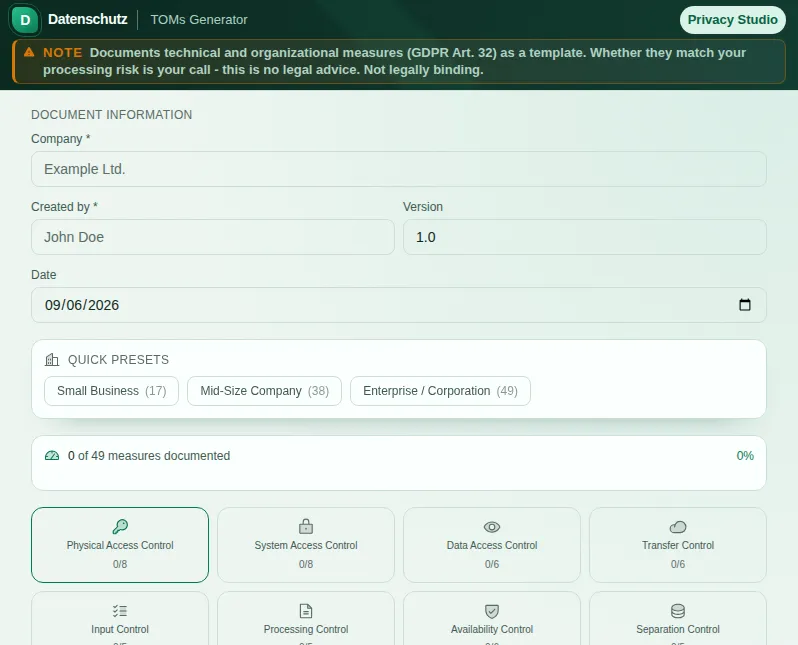
This safe preview shows what the tool is for without running account-only actions.
What TOMs Generator does
Art. 32 GDPR requires you to protect personal data through appropriate technical and organisational measures - matched to the risk. What is appropriate the law does not spell out in detail, and that is exactly what overwhelms many. The TOMs Generator breaks the abstract obligation down into concrete, checkable measures along the established areas of protection, turning a paragraph into a list you can actually work through.
The tool assigns the measures to the classic areas of control familiar from data protection practice: physical access control, system access control, data access control, transfer control, input control, order control, availability control and separation control. For each area you find concrete measures - from the lockable server room through password policies and encryption to the backup concept.
Each measure can be assigned a protection level: basic, standard or enhanced. That way you can match your approach to the actual risk of your processing instead of documenting all or nothing wholesale. Ready-made presets for typical company sizes take the first selection off your hands.
On top there is a checking aid. As you tick measures, the tool counts for each area of control how many of the fitting measures are already ticked. Anything that does not apply to you, such as security staff in a one-person office, you mark as "not applicable" and it no longer counts. The list "These measures are still missing" shows you where to start - a roadmap, not a verdict.
For your company you record the master data - name, author, date, version - and at the end produce a clear PDF of the implemented measures (without the count and without open points) that you can file, attach to a DPA as an annex, attach to your record of processing activities or present to the supervisory authority. Your entries are saved locally as a draft, so you can pause the work and continue later.
The Generator structures your measures and helps you spot gaps. But it makes no legally binding statement about whether your measures are appropriate in the sense of Art. 32 in your specific case - that depends on the concrete risk and the state of the art. Use the tool for structure, documentation and gap analysis, and if in doubt have the appropriateness judged by a data protection professional.
Features
All classic control areas
From physical access through data access and transfer to separation control - the familiar areas in full.
Concrete measures to check off
Server room, password policy, encryption, backup - an abstract duty becomes a workable list.
Three protection levels
Basic, standard or enhanced - match the measures to the actual risk of your processing.
Check for gaps
The tool shows which important measures are missing and where the biggest weaknesses lie.
Implementation level per area
For each control area you see how many fitting measures are ticked. Measures that do not apply are not counted.
Ready-made presets
Presets for typical company sizes take the first selection of measures off your hands.
PDF export and draft
Produce a clear TOMs document as PDF, listing only the implemented measures. Your entries are saved locally as a draft.
How it works
- 1
Choose a preset
Start with a preset for your company size or go straight into the control areas.
- 2
Check off measures
Mark the implemented measures for each area. The implementation level updates immediately.
- 3
Spot the gaps
Tap "Check for gaps" to see which basic measures are still missing.
- 4
Generate the PDF
Enter your company data and export the TOMs document as PDF for your data protection records.
Who needs this
Frequently asked questions
What are TOMs?
TOMs are the technical and organisational measures with which you protect personal data under Art. 32 GDPR. Technical means for example encryption or access protection, organisational means such as policies, training and responsibilities.
Does the generator replace a risk review?
No. The Generator structures your measures and shows what is still missing. Whether your measures are appropriate in the sense of Art. 32 in your specific case depends on the concrete risk and the state of the art and can only be judged professionally. The tool supports you but does not replace advice.
Which control areas does the tool cover?
The classic eight (physical access, system access, data access, transfer, input, order, availability and separation control) plus review & organisation: regular testing under Art. 32(1)(d) GDPR, resilience, confidentiality, training, a data breach process and privacy by default (Art. 25). Each area has concrete measures to check off.
Why do I need a TOMs document?
The GDPR requires you to be able to demonstrate your protective measures. A TOMs document is that evidence. It also belongs as an annex to data processing agreements and is regularly requested in data protection audits.
Are my entries stored?
Your entries are saved locally in your browser as a draft so you can continue the work. You generate the finished PDF yourself and stay in control of it.
Related tools

GDPR Art. 30 Helper
Create your GDPR Article 30 records of processing activities. All required fields, ready to p…
DPIA Quick Check
Check if a DPIA per Art. 35 GDPR is required. Short questionnaire, clear result.

DPA Generator
Create a customizable DPA draft with Art. 28 GDPR building blocks, 9 TOM categories, 8 preset…

Processing Purpose Library
30+ common processing purposes with legal basis, retention periods, data categories, and exam…

Deletion Concept Generator
Create a reviewable draft covering data categories, retention periods, and deletion methods.…
Privacy Policy Generator
Create a customizable privacy-notice draft with 10+ presets, 20+ third-party services, cookie…
Ready to use TOMs Generator?
No installation. Included from Pro. Open it right in your browser.
Open now