


A look inside
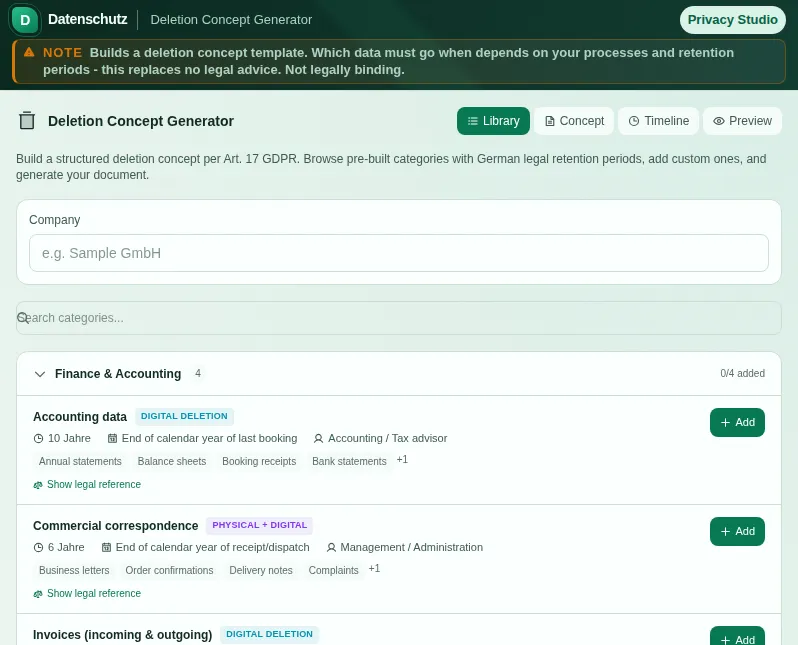
This safe preview shows what the tool is for without running account-only actions.
What Deletion Concept Generator does
The GDPR, through the storage limitation principle, requires that personal data is deleted as soon as it is no longer needed. What makes sense in theory often fails in practice on a simple question: who actually deletes what, when and with which method? Without a written deletion concept this stays a matter of chance - and chance is exactly the wrong thing in a data protection audit. The Generator gives you a clear structure.
At the heart of the tool is a library of typical data categories - from applicant data through customer master data and invoices to application documents and log data. Each category comes with pre-filled suggestions: legal basis, retention period, deletion method, deletion trigger and responsibility. You select the categories that apply to your business and adapt them instead of starting from scratch.
For each category you set how deletion happens: physical, digital or both. A paper folder goes into the shredder, a record is securely removed from the database, some documents both. The deletion trigger states what sets the period in motion - such as the end of a contract or the conclusion of an application. And the responsibility records who actually has to initiate the deletion.
If an important entry is missing or a period is implausible, the tool flags it with a note before you finish the concept. That way it does not only surface during the audit that a category stands there without a period or without a responsible party. Alongside the ready-made templates, you can create your own categories at any time that are not in the library.
Several views show your concept from different angles: the library for selecting, the concept view with all chosen categories, a timeline of the periods and a preview of the finished document. That way you keep the overview while assembling it and see how the result will look in the end. The finished concept can be printed or filed.
The Generator structures your entries and provides a solid basis, but makes no legally binding statement about which period or deletion method is correct in your specific case. Retention periods can overlap and depend on the individual case. Use the tool for the structure and documentation, and if in doubt have the concept reviewed by a data protection professional.
Features
Library of typical categories
Applicant, customer, invoice and log data come pre-filled with period, method and responsibility.
Set the deletion method
Physical, digital or both - you decide how each data category is actually deleted.
Deletion triggers and responsibilities
Record what sets the period in motion and who has to initiate the deletion.
Plausibility hints
Missing entries or inconsistent periods are flagged before you finish the concept.
Custom categories
What the library does not cover, you create yourself - your concept fits your business.
Multiple views
Library, concept, timeline and document preview - your deletion concept from every angle.
Print and file
Print the finished concept cleanly or file it as evidence of your deletion setup.
How it works
- 1
Select categories
Choose the data categories from the library that apply to your business, or create your own.
- 2
Adjust periods and methods
Review the pre-filled periods, deletion methods and responsibilities and adapt them to your case.
- 3
Work through the hints
Add the missing entries the tool points out, so your concept is complete.
- 4
Generate the concept
Look at the preview and print the finished concept or file it with your data protection records.
Who needs this
Frequently asked questions
What is a deletion concept?
A deletion concept is a document that systematically records which data categories your company holds, how long they are kept, when and how they are deleted and who is responsible. It puts the GDPR storage limitation principle into practice.
Does the generator replace professional review?
No. The Generator provides a solid structure and pre-filled suggestions but makes no legally binding statement for your specific case. Which period applies exactly depends on the circumstances. When in doubt, have the concept reviewed by a data protection professional.
What is the difference from the Retention Planner?
The deletion concept is the foundational document describing your data categories, methods and responsibilities. The Retention Planner is the operational tool with which you schedule concrete deadlines and get warned of due deletions. The two complement each other.
Which deletion methods are there?
The tool distinguishes physical, digital and both. Paper records are physically destroyed, digital records securely removed from the systems, and some categories require both because they exist in both forms.
Can I create my own data categories?
Yes. Alongside the ready-made templates from the library, you can create your own categories at any time with their own period, method and responsibility, so the concept fits your business exactly.
Related tools

GDPR Retention Planner
Plan and manage retention periods for all data categories. Timeline, alerts, CSV export.

Processing Purpose Library
30+ common processing purposes with legal basis, retention periods, data categories, and exam…

GDPR Art. 30 Helper
Create your GDPR Article 30 records of processing activities. All required fields, ready to p…

TOMs Generator
Create your GDPR Article 32 TOMs document. Fill out the questionnaire, download PDF, done.

GoBD Archive Zipper
Bundle receipts into a GoBD-oriented archive package with checksums and index. All local, no…

Privacy Policy Generator
Create a customizable privacy-notice draft with 10+ presets, 20+ third-party services, cookie…
Ready to use Deletion Concept Generator?
No installation. Included from Pro. Open it right in your browser.
Open now