


A look inside
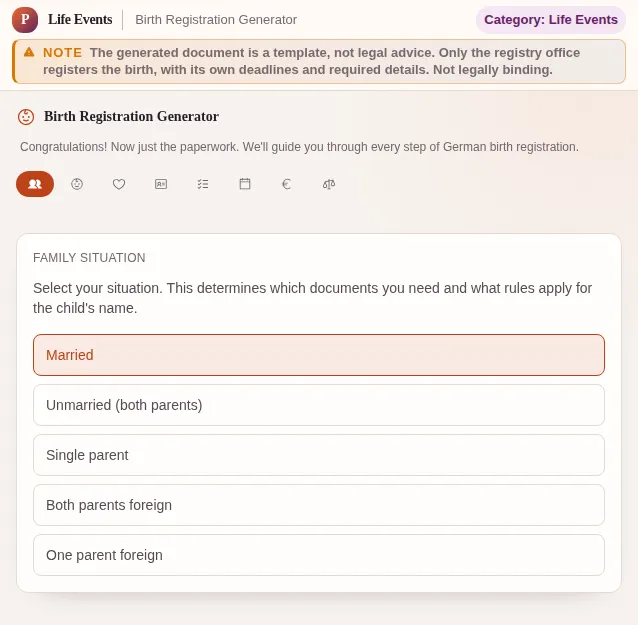
This safe preview shows what the tool is for without running account-only actions.
What Birth Registration Generator does
A child is born, and before you have caught your breath the bureaucracy starts ticking. The birth must be registered with the registry office so your child gets a birth certificate - and without one nothing else moves, not child benefit, not parental allowance, not the child's health insurance. The birth registration generator takes the guesswork out of which papers you need and in what order.
The decisive factor is your family situation, because it determines which documents the registry office wants to see. Married parents need different proofs than unmarried ones, and single parents have their own list again. The generator asks about your constellation and assembles exactly the documents that apply to you - no unnecessary forms, but no gap that earns you a second trip either.
For a hospital birth the clinic usually reports the birth to the registry office, but you still have to supply the papers for the certificate. For a home or birth-centre birth the report is on you or your midwife, and the Civil Status Act deadlines are tight. The generator explains, depending on the place of birth, who does what by when.
A big topic is the name. Married couples with a shared married name pass it on automatically, while everyone else has to actively choose a family name for the child - and that choice is binding. The generator explains the naming rules under the Civil Code in plain language, so you know which names are even possible and what happens if you cannot agree.
For unmarried parents two further building blocks come in: acknowledgment of paternity and the joint custody declaration. Without acknowledgment the father is not legally the father, and without a joint declaration the mother has sole custody. Both can be arranged before the birth and save a lot of paperwork later. The generator points you to these steps and explains where to have them notarized.
After the certificate the chain continues: child benefit at the family fund, parental allowance at the benefit office, registration with the health insurer, and often an application for the child supplement or housing benefit. The generator lays these follow-up steps out as an ordered list so nothing is left undone while you really just want to sleep.
Everything runs in your browser. Your entries stay on the device, there is no account and no transfer to a server. The tool does not replace advice from the registry office, but it makes sure you arrive with the right documents and without a wasted trip.
Features
Situation-based checklist
Married, unmarried or single - the generator shows exactly the documents that apply to you.
Deadlines under the Civil Status Act
Clear deadlines for registering the birth, depending on whether it happened in hospital or at home.
Naming law explained
Which family names are possible for the child and what applies if you cannot agree - in plain language.
Paternity and custody
For unmarried parents: acknowledgment of paternity and custody declaration, why they matter and where to arrange them.
Follow-up steps at a glance
Child benefit, parental allowance, health insurance and more as an ordered list so nothing is left after the certificate.
Documents to bring
A printable list of the documents so you forget nothing at the registry office and avoid a second trip.
Runs in the browser, no account
No signup, no data transfer. Your entries stay on your device.
How it works
- 1
Describe your situation
Select whether you are married, unmarried or a single parent, and where the child was born.
- 2
Settle the name question
The generator shows which family names are possible for your child and what you must declare at the registry office.
- 3
Generate the checklist
You get the matching document list plus the deadlines for registering the birth.
- 4
Work through the follow-ups
After the certificate the tool walks you through child benefit, parental allowance and health insurance.
Who needs this
Frequently asked questions
By when must the birth be registered?
Under the Civil Status Act the birth must be reported to the responsible registry office within one week. For a hospital birth the clinic usually handles it. For a home or birth-centre birth the report is on the parents or the midwife. The generator states the deadline that applies to you.
Which documents do I need for the birth certificate?
It depends on your situation. Married couples usually need the marriage certificate and ID cards, unmarried couples additionally the paternity acknowledgment and custody declaration, single parents their own birth certificate. The generator assembles the right list for your constellation.
Which surname will our child get?
If you share a married name, the child gets it automatically. Without a shared married name you must choose one of the two surnames. That choice then also applies to further shared children. The generator explains the rules under the Civil Code.
What extra steps do unmarried parents need?
Unmarried parents should arrange the acknowledgment of paternity and, if both want custody, a joint custody declaration. Both can be done before the birth at the registry office or youth welfare office and save effort later. The generator points to these steps.
What comes after the birth certificate?
With the birth certificate you apply for child benefit at the family fund, parental allowance at the benefit office, and register the child with your health insurer. Depending on income the child supplement or housing benefit may follow. The generator lays out these follow-ups in order.
Does the tool store our data?
No. The generator runs entirely in your browser, there is no account and no transfer to a server. Your entries stay on the device, and you can simply print or take the checklist with you.
Related tools

Paternity Recognition Helper
Step-by-step paternity acknowledgment guide: scenario quiz, document checklist, venues and co…

Baby Admin Timeline
Every bureaucratic step from pregnancy to the first birthday. Deadlines, documents, legal ref…
Parental Allowance Calculator
Calculate your German parental allowance per BEEG: basic, ElterngeldPlus, and partnership bon…
Child Benefit Calculator
Calculate child benefit entitlement. Current rates, child allowance comparison and applicatio…

Name Change Tracker
Track all institutions you need to notify after a name change. Marriage, divorce, adoption, S…

Custody Rights Explainer
Who has custody? Interactive quiz, custody declaration, visitation rights (BGB 1684), residen…
Ready to use Birth Registration Generator?
No installation. Included from Plus. Open it right in your browser.
Open now