


A look inside
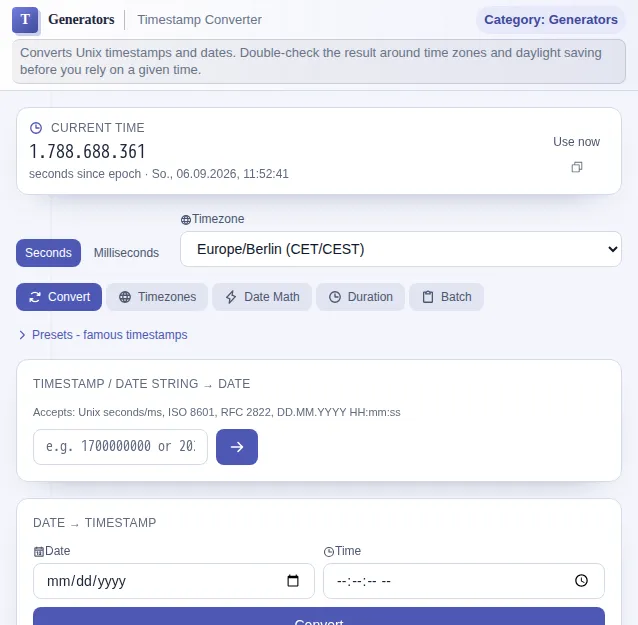
This safe preview shows what the tool is for without running account-only actions.
What Timestamp Converter does
A Unix timestamp like 1751500800 is wonderful for machines and unreadable for humans. Anyone working in logs, databases or APIs keeps tripping over these numbers and wants just one thing: what date is this actually? This converter answers the question both ways - the number becomes a date, the date becomes the number.
Seconds or milliseconds - both units are supported, because some systems count seconds since 1 January 1970 while others count milliseconds. You switch, the tool computes accordingly. You see the result in several formats at once: ISO 8601, a human-readable date, the relative "three hours ago" and more, each copyable with one click.
Time zones are the classic source of errors. The converter shows a timestamp in parallel across fourteen important zones - from Berlin through UTC, London and New York to Tokyo, Shanghai and Sydney. So you can see at a glance when an event happened in California while you are looking at the clock in Germany, daylight saving included.
The math mode turns timestamps into a kind of calculator for time. Add days, hours or minutes to a timestamp or subtract them to find out when a deadline expires or when an event started. The duration mode measures the span between two moments and breaks it down neatly into years, months, weeks, days, hours, minutes and seconds.
If you work with many values, use the batch mode and convert a whole list of timestamps at once. Ready-made presets provide typical moments for quick testing, and the current time is always just one click away.
Everything runs locally in your browser. No timestamp and no date is sent to a server. The tool is fast, works offline and needs neither account nor signup - exactly right for a quick job you do in passing.
Features
Both directions
From Unix timestamp to date and from date back to timestamp, live and without detours.
Seconds and milliseconds
Both units are supported so you can work with any system and any API.
Fourteen time zones in parallel
One timestamp at once in Berlin, UTC, New York, Tokyo and ten more zones.
Multiple formats
ISO 8601, a human-readable date and a relative time, each copyable with one click.
Timestamp arithmetic
Add or subtract days, hours or minutes to find deadlines and start times.
Measure durations
The span between two moments, broken down into years, months, weeks, days, hours and minutes.
Batch and offline
Convert whole lists at once. Everything runs locally in the browser, no server and no account.
How it works
- 1
Choose a tab
Convert, time zones, math, duration or batch - depending on what you need.
- 2
Enter a timestamp or date
Paste a number or pick a date. Set the unit to seconds or milliseconds.
- 3
Read the result
Date, ISO format, relative time and the time zones appear instantly and clearly.
- 4
Copy
Copy the format you want to the clipboard with one click.
Who needs this
Frequently asked questions
What is a Unix timestamp?
A Unix timestamp is the number of seconds elapsed since 1 January 1970 at 00:00 UTC - the so-called epoch. Some systems count milliseconds instead. The tool supports both.
Seconds or milliseconds - how do I tell?
As a rule of thumb: a timestamp in seconds has ten digits today, one in milliseconds has thirteen. If the converted date lands far in the future or past, you probably picked the wrong unit - just switch it.
Does the tool account for daylight saving time?
Yes. The time zone display uses the real time zone rules, so the switch between summer and winter time is handled correctly. Berlin is shown as CET or CEST depending on the date.
Can I do arithmetic with timestamps?
Yes. In math mode you add or subtract days, hours and minutes from a timestamp. The duration mode also measures the span between two moments and breaks it down into years, months, days and more.
Are my inputs stored?
No. All calculations run locally in your browser. No timestamp and no date is sent to a server or stored. The tool works offline too.
Related tools

Date Calculator
Calculate days between dates and German legal deadlines using statewide holiday rules for all…

Cron Builder
Create cron expressions visually with preview of next execution times.

UUID Generator
Generate UUIDs (v4) individually or in batch. Copy, choose formatting, use instantly. Runs in…

Unit Converter
Convert length, weight, volume, temperature, area, and more. All common units covered. Free,…

JSON Formatter
Format, validate, and minify JSON with syntax highlighting and error detection. Free, runs in…
Ready to use Timestamp Converter?
No installation. Included from Plus. Open it right in your browser.
Open now