

Взгляд внутрь
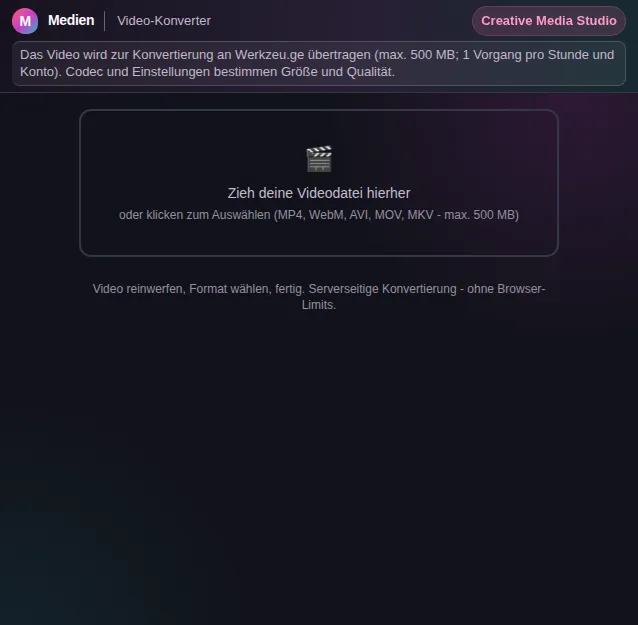
Этот безопасный просмотр показывает, для чего нужен инструмент, не выполняя действий, требующих аккаунта.
Что умеет Video-Konverter
Video formats are a little Bermuda triangle of everyday digital life. The editing course wants MP4, the old camera delivers MOV, a downloader spits out WebM, and the presentation software only knows AVI. The Video Converter ends this format chaos: you drop your video in and choose which format it should become - the rest happens automatically.
Five of the most important containers are available: MP4 as the universal standard for web and messenger, WebM for lightweight web videos, AVI for older programs and Windows workflows, MOV for the Apple world and editing suites, and MKV for high-quality archives with multiple audio and subtitle tracks. Whatever you start with, the right output is one click away.
The conversion is handled by FFmpeg, the reference tool of the video world, server-side. That matters, because a real conversion decodes and re-encodes the entire video. On a server this is fast and reliable while your own computer stays quiet. Files up to 500 MB are allowed, so longer clips get through that pure browser libraries fail on.
Before you convert, you see your video in a preview and its file size. After conversion you get another preview of the result along with the new size and format for a direct comparison. So you notice right away whether the target format makes sense for your purpose - some formats are smaller, others higher in quality.
Your file is processed only for the conversion and not stored permanently. You download the finished video directly or file it in your archive with one click. No account needed, no email address, no watermark on your video.
The Video Converter plays well with the other media tools. If the video is still too big afterwards, the Video Compressor helps; if you only want a section, use the Video Trimmer; if you need only the sound, Video to Audio extracts it. All in the same browser, without your files touring third-party online services.
Функции
Five common formats
Convert between MP4, WebM, AVI, MOV, and MKV - from the universal web standard to the high-quality archive format.
FFmpeg quality
Conversion runs on FFmpeg, the reference tool of the video world, for reliable and clean results.
Большие файлы до 500 MB
Server-side processing handles longer videos too, without bringing your browser or computer to its knees.
Before-and-after preview
See your video before and after conversion, with file size and format for a direct comparison.
No watermark, no account
The result comes to you without a watermark, without signup, and without any email requirement.
Сразу в Aktenschrank
File the converted video in your archive with one click or simply download it.
Как это работает
- 1
Загрузить видео
Drag the file into the drop zone or click to select it. Up to 500 MB is accepted.
- 2
Выбрать целевой формат
Tap MP4, WebM, AVI, MOV, or MKV depending on where the video should run afterwards.
- 3
Конвертировать
Click Convert and let FFmpeg transform the video in the background.
- 4
Сравнить и сохранить
Проверь результат в предпросмотре и скачай его или положи в Aktenschrank.
Кому это нужно
Частые вопросы
Which formats does the converter support?
The available target formats are MP4, WebM, AVI, MOV, and MKV. As a source file, these and other common video formats up to 500 MB are accepted.
Какой формат выбрать?
MP4 is the safest choice for web, messenger, and mobile devices. WebM suits lightweight web videos, MOV the Apple world and editing suites, MKV high-quality archives, and AVI older Windows programs.
Does conversion reduce quality?
Every conversion re-encodes the video, so minor quality loss is normal. FFmpeg works as cleanly as possible, so the difference is barely visible for most purposes.
Is there a watermark?
No. The converted video comes to you without a watermark, without signup, and without hidden surcharges.
Сохраняется ли мой файл?
Your file is processed only for the conversion and not kept permanently. You download the result or deliberately file it in your archive.
Похожие инструменты

Video-Kompressor
Komprimiere Videos mit einstellbarer Qualität. Dateigröße reduzieren.

Video-Schneider
Schneide Videos mit Timeline-Vorschau. Anfang und Ende per Drag festlegen.

Video-zu-Audio
Extrahiere die Tonspur aus Videos als MP3, WAV oder OGG.

Video-zu-GIF
Wandle Videoclips in GIF-Animationen um. Bereich, FPS und Breite einstellbar.

Конвертер аудиоформатов
Wandle Audiodateien zwischen MP3, WAV, OGG, FLAC und AAC um. Serverseitige Verarbeitung.

GIF-zu-MP4
Wandle GIF-Animationen in MP4-Videos um. Serverseitig mit FFmpeg und H.264. Bis zu 90 % klein…
Начнём с Video-Konverter?
Без установки. Входит в Plus. Открывай прямо в браузере.
Открыть сейчас