


A look inside
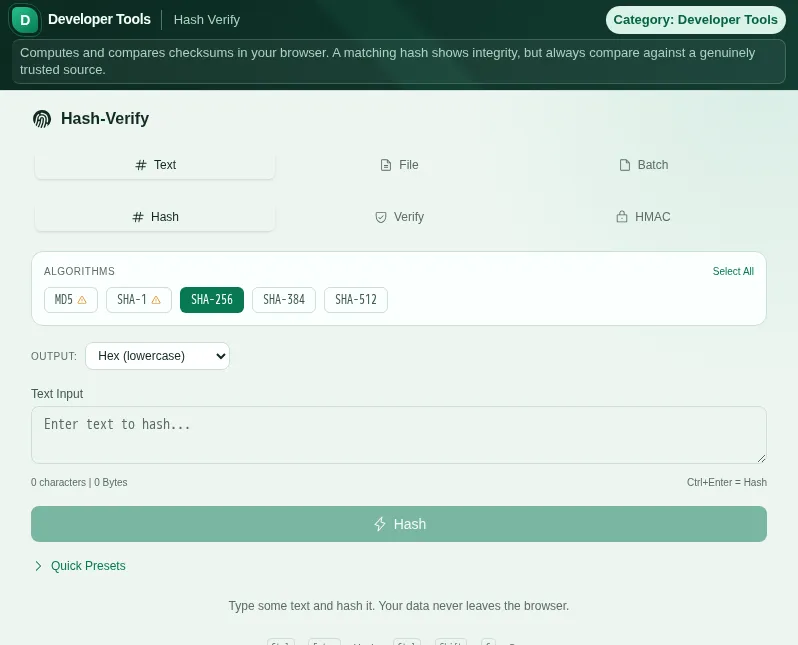
This safe preview shows what the tool is for without running account-only actions.
What Hash Verify does
A hash is the digital fingerprint of a file or text: any number of bytes is turned into a fixed, short string. Change even a single bit and the hash looks completely different. That is exactly why reputable providers publish a SHA-256 checksum next to their downloads - and with Hash Verify you recompute it instead of trusting blindly.
The tool works in three modes. In hash mode you simply compute the checksum for your input. In verify mode you additionally enter the expected hash, and the tool tells you with a clear green or red whether it matches - no more manual character-by-character comparison. In HMAC mode a secret key is added so you can recompute signed messages and API signatures.
Whether text or file, you choose via the tabs. For text you type or paste directly. For files you drag and drop them or pick them - large files too, because the computation runs right in your browser. And when you want to check several files at once, batch mode handles it in one pass and lets you export the results as a text list.
The common algorithms are supported, from MD5 through SHA-1 to the whole SHA-2 family. An honest word on this: MD5 and SHA-1 are considered cryptographically broken and are unsuitable for security purposes like signatures. For simple integrity checks and reconciling old checksums that still exist, they remain useful - which is why they are on board, but with the knowledge of what you should no longer use them for. For anything security-relevant, use SHA-256 or larger.
For HMAC you can choose the encoding of the result so the output matches what your counterpart expects. Every result can be copied with one click, and a history view remembers your recent computations within the session so you do not have to retype everything.
The decisive point: everything happens client-side via your browser's Web Crypto API. No file, no text, no key is ever sent to a server. That is not just fast, it is the only serious way to compute hashes - because uploading a checksum to have it verified would defeat the whole point. No account, no signup, no data leaving your device.
Features
Five hash algorithms
MD5, SHA-1, SHA-256, SHA-384 and SHA-512 - from a fast integrity check to a strong digest.
Hash, verify and HMAC
Compute a checksum, compare against an expected value or sign with a secret key.
Text, file and batch
Enter text directly, hash files via drag and drop, or check several files in one pass.
Clear verify result
Enter the expected hash and see with a clear green or red whether it matches - no manual character comparison.
Batch export
Hash several files at once and export the results as a text list.
All in the browser, no upload
Web Crypto API client-side - no file, no text, no key leaves your device.
How it works
- 1
Pick mode and source
Choose hash, verify or HMAC and whether you are checking text, a file or several files.
- 2
Set the algorithm
Choose SHA-256 for security, MD5 or SHA-1 only for reconciling old checksums.
- 3
Provide the input
Type text or drag a file in. For verify, also enter the expected hash.
- 4
Read and copy the result
Copy the checksum, check the verify status or export the batch results as a list.
Who needs this
Frequently asked questions
What do I need a checksum for?
To make sure a file is unchanged and complete. Many providers publish a SHA-256 checksum next to their downloads. Recompute it with Hash Verify and if both match, you know the file was not corrupted or tampered with.
Are MD5 and SHA-1 still secure?
Not for security purposes - both are considered cryptographically broken and should not be used for signatures or passwords. For simple integrity checks and reconciling old, already existing checksums they remain usable. For anything security-relevant use SHA-256 or larger.
What is the difference between hash and HMAC?
A hash needs only the input. An HMAC additionally combines the input with a secret key and is used to authenticate messages and API requests. Only someone who knows the key can produce the same HMAC.
Are my files uploaded?
No. The entire computation runs via your browser's Web Crypto API. No file, no text and no key is sent to a server. That is the only serious way to check hashes.
How do I check several files at once?
Switch to batch mode and drop several files in. The tool hashes them in one pass and you can export the full result list as text.
Can I verify a hash directly?
Yes. In verify mode you enter the expected hash alongside the input, and the tool immediately shows you with green or red whether they match.
Related tools

Password Generator
Generate cryptographically secure passwords and passphrases. Customize length and character s…

UUID Generator
Generate UUIDs (v4) individually or in batch. Copy, choose formatting, use instantly. Runs in…

Base64 Encode/Decode
Encode or decode text and files to/from Base64. Runs in your browser, no server upload. UTF-8…

JWT Inspector
Decode and analyze JWT tokens. Header, payload and expiry at a glance.

Password Vault
Manage passwords encrypted: Web Crypto API, AES-256-GCM, and PBKDF2, with encryption in your…
JSON Formatter
Format, validate, and minify JSON with syntax highlighting and error detection. Free, runs in…
Ready to use Hash Verify?
No installation. Included from Plus. Open it right in your browser.
Open now