

İçine bir bakış
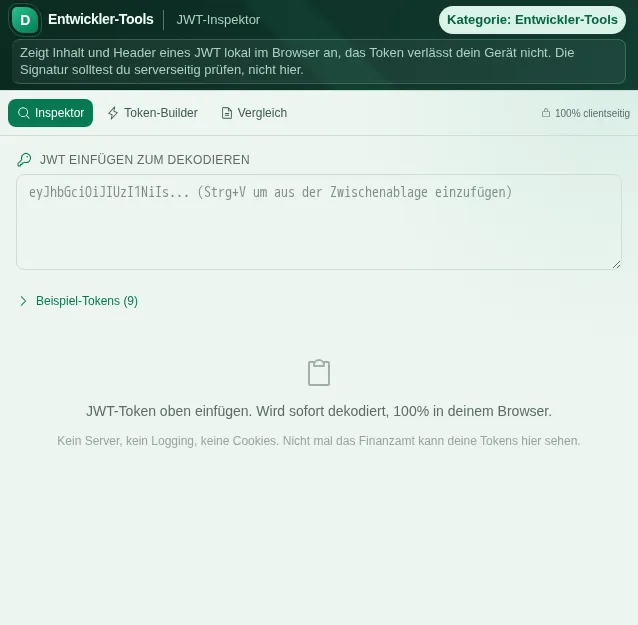
Bu güvenli önizleme, hesaba bağlı eylemler çalıştırmadan aracın ne işe yaradığını gösterir.
JWT-Inspektor neler yapar
JSON Web Tokens are everywhere modern authentication happens: OAuth2 access tokens, session cookies, API keys, single sign-on. They look like cryptic gibberish but are really just three Base64-encoded parts separated by dots. The JWT Inspector makes them readable and answers the questions you actually have while debugging: what is inside, who is it for, and when does it expire?
You paste your token - an optional Bearer prefix is stripped automatically - and immediately see three cleanly separated panels. The header reveals the signature algorithm and optionally the key ID. The payload shows all claims, with standard claims like iss, sub, aud, exp, nbf, iat and jti explained in plain language so you do not have to look up what each abbreviation means. The signature is shown as its own block.
The most useful practical helper is the expiry display. Instead of converting a Unix timestamp in your head, you get a clear status banner - valid, expiring soon or expired - along with a live ticking countdown. A token without an exp claim is flagged too, because a token that never expires is rarely a good idea. A timeline shows issuance, valid-from and expiry relative to each other.
For HMAC-signed tokens (HS256, HS384, HS512) you can check directly whether the signature is correct: you enter the secret, and the inspector recomputes the signature via your browser's Web Crypto API and shows with a green or red badge whether it is valid. For asymmetric methods like RS256 or ES256 the inspector shows the algorithm and an assessment of its security; the cryptographic verification of these signatures with a public key is not part of this tool's job.
Beyond the pure inspector there are two more modes. The token builder assembles a new HS-signed token from a header, a payload and a secret - handy for testing. The compare mode puts two tokens side by side and marks claim by claim what is identical, what differs and what exists only in one of them - worth gold when a login works sometimes and not others.
A size warning speaks up when your token approaches the usual HTTP header limits, because overloaded tokens are silently rejected by some servers and proxies. Ready-made example tokens - from a standard HS256 through an expired one to a German authority scenario - help with trying things out and learning.
Everything runs 100% client-side. Your token, your secret, your claims - none of it is sent to a server or stored. With credentials that is not just fast but the only defensible way to work. No account, no signup, no data leaving your device.
Özellikler
Header, payload, signature separated
Every token split into three cleanly labelled panels, with algorithm and key ID in the header.
Claims in plain language
Standard claims like iss, sub, aud, exp, nbf, iat and jti are explained - no looking up needed.
Live expiry countdown
Status banner valid, expiring soon or expired, with a ticking countdown and timeline.
Verify HMAC signature
Enter the secret and verify the HS256/384/512 signature right in the browser - green or red.
Token builder
Build a new HS-signed token from header, payload and secret - handy for testing.
Compare two tokens
Compare claim by claim: same, different or only in one - perfect for debugging.
100% client-side
Token and secret never leave your browser. Nothing is sent to a server or stored.
Nasıl çalışır
- 1
Paste the token
Paste your JWT - a Bearer prefix is removed automatically. Or take one of the example tokens.
- 2
Read header and payload
Look at the algorithm, claims and plain-language explanations and check the expiry countdown.
- 3
İmzayı doğrula
For HS tokens enter the secret to verify the signature - a green badge means valid.
- 4
Build or compare
Create a test token in the builder or compare two tokens claim by claim in compare mode.
Kimin işine yarar
Sık sorulan sorular
Is a JWT encrypted?
No. A standard JWT is only Base64-encoded, not encrypted - anyone can read the header and payload. The signature only protects against tampering, not against reading. So never put secrets in the payload.
Can the inspector verify the signature?
For HMAC-signed tokens (HS256, HS384, HS512), yes: you enter the secret and the inspector recomputes the signature in the browser. For asymmetric methods like RS256 or ES256 it shows the algorithm and its security assessment, but does not verify the signature with a public key.
How do I tell whether a token is expired?
The inspector reads the exp claim, converts it to a date and shows a status banner with a live countdown: valid, expiring soon or expired. If the exp claim is missing, that is clearly flagged too.
Is my token or secret uploaded?
No. The JWT Inspector works 100% in your browser. Neither the token nor the secret nor the claims are sent to a server or stored. With credentials that is the only safe approach.
Why is my token warned as too large?
Very large tokens hit the usual HTTP header limits (often around 8 KB). Some servers and proxies then reject them silently. The size warning helps you spot this before it causes mysterious errors in production.
What does compare mode show?
It puts two tokens side by side and marks every claim for header and payload: same, different or present in only one of them. Ideal for finding out why one login works and another does not.
Benzer araçlar

JSON-Formatierer
Formatiere, validiere und minimiere JSON mit Syntaxhervorhebung und Fehlererkennung. Kostenlo…

Hash-Verify
Berechne MD5, SHA-1, SHA-256, SHA-384, SHA-512 Hashes und HMAC. Dateien und Texte hashen, ver…
Base64 Encoder/Decoder
Text und Dateien in Base64 kodieren oder dekodieren. Direkt im Browser, kein Server-Upload. U…

Timestamp Converter
Rechne Unix-Timestamps in Datumsangaben um und umgekehrt. Mehrere Zeitzonen, alle gängigen Fo…

UUID oluşturucu
Erzeuge UUIDs (v4) einzeln oder im Batch. Kopieren, Formatierung wählen, sofort verwenden. Di…
Regex-Tester
Teste reguläre Ausdrücke mit Live-Highlighting und deutschen Muster-Vorlagen.
JWT-Inspektor için hazır mısın?
Kurulum yok. Plus planından itibaren dahil. Doğrudan tarayıcıda aç.
Şimdi aç