

Rzut oka do środka
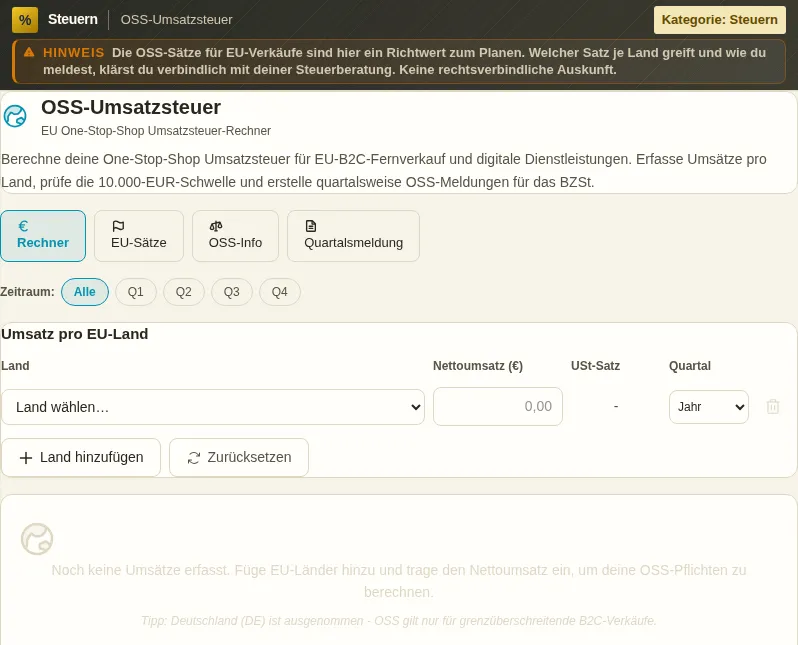
Ten bezpieczny podgląd pokazuje, do czego służy narzędzie, bez wykonywania akcji wymagających konta.
Co potrafi OSS-Umsatzsteuer
If you sell from Germany to private customers in other EU countries - e-books, software, online courses or physical distance sales - you must charge the destination country's VAT above a certain limit. The One-Stop-Shop scheme (OSS) turns that into a single filing with the Federal Central Tax Office instead of registering separately in every country. The calculator does the number-crunching for you.
The key point is the EUR 10,000 threshold under Section 3c of the VAT Act. It applies EU-wide, added up across all countries. Stay below it and you may keep applying German 19% to all EU B2C sales - simple, but not always cheap. Exceed it and the destination principle applies: every sale carries the buyer country's rate. The calculator shows instantly which side of the threshold you are on.
For each country the tool holds the current rates - from a low 17% in Luxembourg to 27% in Hungary, plus reduced, super-reduced and parking rates. You enter net revenue per country, optionally pick the quarter, and VAT is calculated country by country. A direct comparison shows how the tax burden differs from the German 19% option.
OSS filing is quarterly. The calculator groups your revenue into Q1 to Q4 and knows the deadlines: April 30, July 31, October 31 and January 31 of the following year. You file via the BZSt online portal (ELSTER), and the BZSt then distributes the tax to the destination countries.
The tool covers three schemes: the Union scheme (Section 18i) for EU-established businesses, the Non-Union scheme (Section 18j) for third-country providers, and the Import One-Stop-Shop IOSS (Section 18k) for consignments from third countries up to EUR 150. For each scheme it explains who uses it, what it covers and where you register.
Finally the calculator produces a clean report - broken down by quarter and country, with net revenue, rate and tax amount, plus the legal references. Copy it for your records or as a template for the actual OSS filing. The calculation runs client-side; the server-side VAT ID check is optional.
The OSS calculator is a tool, not tax advice. It helps you get the right ballpark and the right rates - the binding filing and the registration stay your responsibility.
Funkcje
EUR 10,000 threshold check
Adds up your EU revenue and tells you instantly whether you are below or above the Section 3c threshold.
Rates for all 27 EU states
Standard, reduced, super-reduced and parking rates as of 2026 - from 17% Luxembourg to 27% Hungary.
Revenue per country
Enter net revenue per country; VAT is calculated country by country with the correct rate.
Quarterly report with deadlines
Revenue grouped by Q1 to Q4, including the OSS deadlines Apr 30, Jul 31, Oct 31 and Jan 31.
Three OSS schemes explained
Union (§ 18i), Non-Union (§ 18j) and Import OSS/IOSS (§ 18k) with prerequisites and scope.
Comparison to German VAT
See at a glance how much the country rates shift the burden versus the German 19% option.
Copyable report text
A cleanly broken-down report by quarter and country as a template for your OSS filing.
Jak to działa
- 1
Add EU countries
Pick the countries you sell to. Germany is excluded, since OSS only applies cross-border.
- 2
Enter net revenue
Enter net revenue per country and optionally pick the quarter the revenue belongs to.
- 3
Check threshold and rates
The calculator shows whether you are over the EUR 10,000 threshold and applies the right country rates.
- 4
Copy the quarterly report
Generate the report by quarter and country and transfer it into your OSS filing via the BZSt portal.
Dla kogo
Częste pytania
When do I need the OSS scheme?
As soon as your cross-border B2C sales within the EU together exceed EUR 10,000 per year (Section 3c), the destination principle applies. You then either register in each country or - far simpler - file via OSS at the BZSt. Below the threshold you may apply German 19%.
Is the EUR 10,000 threshold per country or total?
Total. The threshold is summed across all EU countries, not per country. A single large order or many small sales can breach it together. That is exactly why the OSS calculator adds up your country revenue.
When do I have to file the OSS report?
OSS filing is quarterly. Deadlines are April 30, July 31, October 31 and January 31 of the following year - each the end of the month after the quarter closes. Filing runs through the BZSt online portal, and payment goes to the BZSt too.
What is the difference between OSS and IOSS?
OSS (Section 18i / 18j) covers intra-community distance sales and digital services. IOSS (Section 18k) is the Import One-Stop-Shop for goods imported into the EU from a third country with an intrinsic value up to EUR 150. IOSS simplifies import VAT on small consignments.
Do I have to register in every EU country?
No, that is exactly what OSS avoids. You register once in your home country - in Germany at the BZSt - and report all EU B2C sales centrally. The BZSt then distributes the tax to the respective destination countries.
Are the rates in the calculator current?
The standard and reduced rates are as of 2026 and are updated when they change. EU countries do adjust their rates occasionally, so for larger amounts double-check the destination country's current rate. The calculator is not tax advice.
Podobne narzędzia

MwSt-Rechner
Berechne Netto- und Bruttopreise mit 19 % oder 7 % Mehrwertsteuer oder einem eigenen Satz. Ko…

Reverse-Charge Validator
Prüfe ob eine EU-Rechnung korrekt das Reverse-Charge-Verfahren (§13b UStG) anwendet. USt-ID-V…

MwSt-Wechsel-Timer
Berechne, wann du die 25.000-EUR-Vorjahresgrenze oder 100.000-EUR-Sofortgrenze erreichst. Mon…

Rechnungssystem
Komplettes Rechnungssystem: Angebot, Auftragsbestätigung, Lieferschein, Rechnung, Storno, Gut…

SKR-Mapper
Durchsuche die enthaltenen SKR03-/SKR04-Konten und vergleiche Zuordnungen. Kein Bank-CSV-Impo…

ZUGFeRD-Embedder
Bette ZUGFeRD/Factur-X-XML in bestehende PDFs ein (PDF/A-3, EN 16931, XRechnung 3.0 mit Leitw…
Chcesz zacząć z OSS-Umsatzsteuer?
Bez instalacji. W cenie od Pro. Otwórz prosto w przeglądarce.
Otwórz teraz